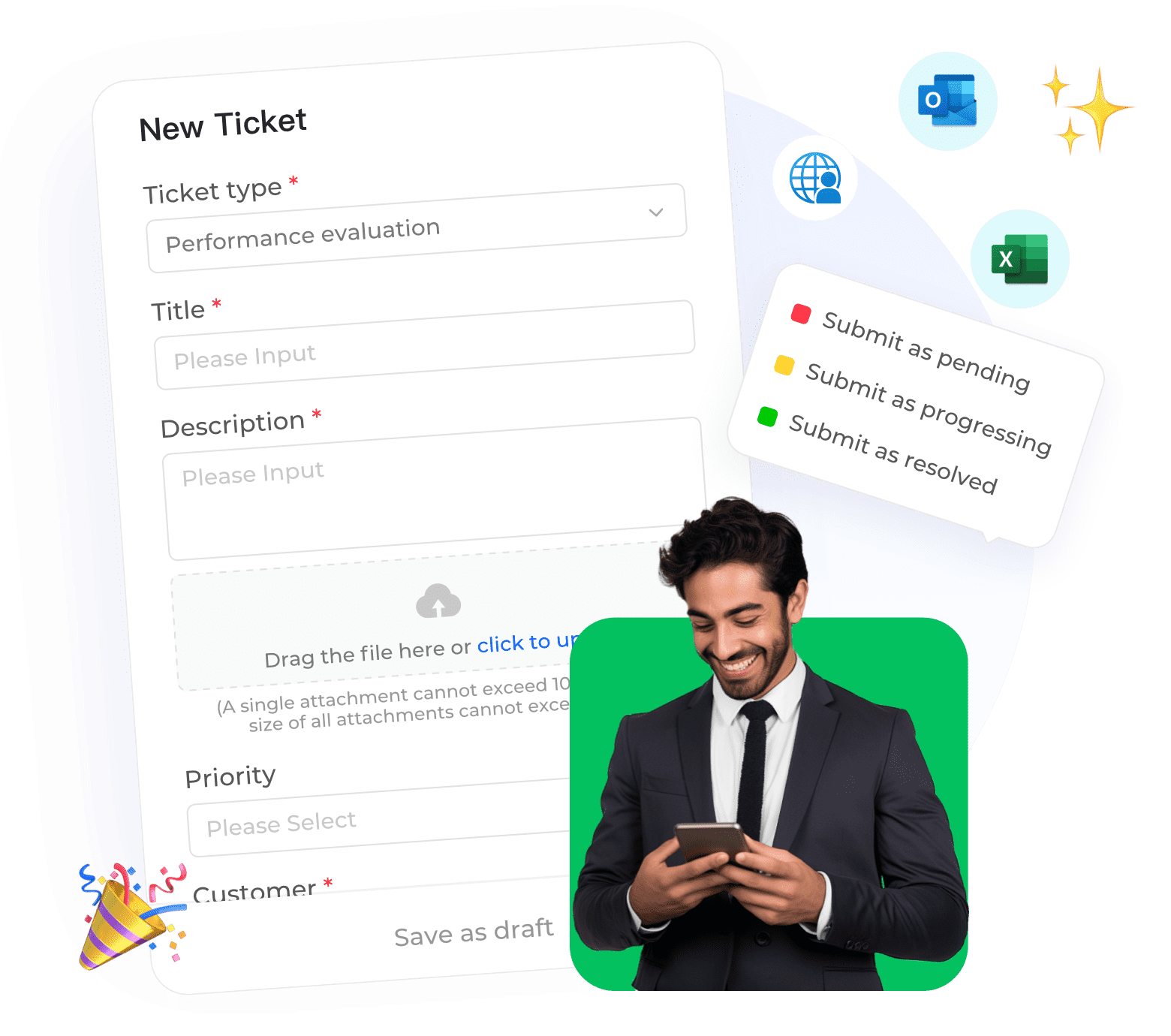

A unified ticket system is the engine for modern support operations.This digital ticket system improves the attendee experience by centralizing requests and automating ticketing workflows.This ticketing is key for faster customer support.A quality ticket system helps businesses meet expectations for speed and satisfaction.In fact,79% of consumers desire a fast response when they contact a brand.
Solutions like the Instadesk Ticket System,which integrates with the Instadesk call center and uses Instadesk AI,deliver improved customer satisfaction.This ticketing system transforms support operations and customer support.Digital ticketing systems are essential for efficient ticketing.This ticketing system handles all ticketing needs,making ticketing simple.
What is a Digital Ticket System?
A digital ticket system is a software tool that captures,manages,and tracks every customer request.This online ticket system turns each query from email,chat,or phone calls into a unique ticket.This process shows how a ticket system works to organize support.It creates a central place for all customer issues,ensuring no request gets lost.The system helps teams resolve problems efficiently from start to finish.
The Role of a Ticket System
A ticket system serves several key roles in a support operation.It automates the entire ticket management process.Key functions often include:
•Ticket Creation:The system automatically generates digital tickets from customer emails,web forms,or chats.
•Categorization:It sorts and prioritizes each ticket based on urgency or issue type.This helps teams focus on the most critical event.
•Tracking:Agents can track the status of all digital tickets,add notes,and see a full history of interactions for better event management.These different functions represent various types of ticket systems capabilities.This organized ticketing process ensures every event is handled properly.
1. Unifying Customer Communications
Businesses often struggle to manage conversations across disconnected channels.This fragmentation can lead to inconsistent service and customer frustration.An online ticket system solves this by acting as a central hub.It gathers all customer communications into one shared workspace.This unified ticketing approach means agents can see and respond to every query,regardless of its origin.It creates a seamless attendee experience.
2. Creating a Single Customer View
An online ticket system makes this possible.It builds a complete customer profile by linking every e-ticket and interaction to one ID.When an agent views a ticket,they see the customer's entire history.This knowledge helps them provide faster,more accurate support without asking customers to repeat information.This is how a ticketing system works to improve satisfaction.These digital tickets are crucial for effective event management.
3. Streamline Incident and Event Management
Digital ticket systems provide a structured framework for incident and event management.Every customer issue is treated as a trackable event.The ticket system automates event registration by creating digital tickets for each new event.This is a core part of event ticketing.It helps teams follow clear workflows for every type of event,from simple questions to complex problems.An online ticket system improves ticket sales for services by resolving issues quickly.Good event management ensures every event is resolved.This structured approach to event management is why many types of ticketing systems exist.This ticketing process is vital for any event.
Automate Workflows for Faster Service
Automation is the force multiplier for any support team.It eliminates repetitive manual tasks,reduces the chance of human error,and accelerates the entire service process from the first contact to the final resolution.By automating key workflows,a digital ticket system empowers teams to handle a higher volume of requests with greater speed and accuracy.This shift allows agents to focus their expertise on solving complex customer problems rather than getting bogged down in administrative work.
1. Automate Ticket Creation
Manual ticket creation is slow and prone to error.An agent might forget to log a call or misplace an email,leaving a customer without support.An online ticket system solves this problem by automatically capturing customer inquiries from various channels and converting them into trackable digital tickets.This ensures every request becomes a documented event.
This automation works across multiple platforms:
Email:Customer emails sent to a support address are instantly turned into new digital tickets.
Web Forms:Submissions from a "Contact Us" page on a website generate tickets automatically.
Social Media:Direct messages or mentions on social platforms can be configured to create a new ticketing event.
Chat&Voice:Transcripts from live chats or voicemails can also trigger ticket creation.
This process guarantees that no customer interaction is overlooked.By removing the need for manual data entry,this form of ticketing immediately reduces the risk of missed inquiries and ensures every event receives the necessary follow-up.

2. Intelligent Ticket Routing
Once a ticket is created,it needs to get to the right person.Manual assignment can create bottlenecks,with managers spending valuable time distributing tasks.Intelligent ticket routing automates this process using predefined rules.A ticket system can analyze incoming digital tickets and assign them based on:
Issue Type:Tickets with keywords like "billing" or "refund" go directly to the finance team.
Customer Priority:High-value clients can be automatically escalated to senior agents.
Agent Skillset:Technical questions about a specific product feature are routed to a product specialist.
Sentiment:AI can detect urgent or frustrated language and assign the ticket a higher priority.
For example,Instadesk's Ticket System uses custom trigger rules to analyze ticket content and automatically route it to the most qualified agent or department.This ensures the right expert handles the event from the start.The impact on efficiency is significant,dramatically reducing the time it takes to begin work on a resolution.
| Aspect | Manual Ticketing | Automated Ticketing |
| Average Resolution Time | Hours to Days | Minutes to Hours |
| First Response Time | Slow and inconsistent | Fast and predictable |
This automated approach to ticketing can lead to a 20-40% reduction in average ticket resolution time,directly improving customer satisfaction and boosting ticket sales for services.
3. Manage Service Level Agreements (SLAs)
A Service Level Agreement (SLA) is a promise to your customers about response and resolution times.For example,a company might promise to respond to high-priority issues within one hour.A digital ticketing system is essential for monitoring and enforcing these standards.Industry benchmarks for SLAs vary,but top performers aim for fast turnarounds.
| Industry | Critical Response Time | Critical Resolution Time |
| Financial Services | 5 minutes | 1 hour |
| Healthcare | 5-15 minutes | 1-4 hours |
| Retail | 15-30 minutes | N/A |
Meeting these targets manually is nearly impossible.A ticket system helps by providing SLA reminders that agents when a deadline is approaching.Instadesk's Ticket System also uses features like time-triggered actions and automated customer notifications to keep the process moving.If a ticket is nearing its SLA breach,the system can automatically escalate it or notify a manager,ensuring every event is handled on time.
4. Unify Your Online Ticket System
Using separate tools for email,chat,and social media creates information silos.Agents waste time switching between platforms,and the customer experience becomes fragmented.A unified online ticket system consolidates all interactions into a single,centralized workspace.This approach transforms support operations.
The benefits of a single platform for digital ticketing are clear:
Centralized Agent Workspace:Agents see every customer query from every channel in one place,along with the customer's full history.This eliminates the need to switch between different tools.
Improved Collaboration:Features like private notes and mentions allow agents to work together seamlessly on a single event,leading to faster and more accurate answers.
Enhanced Productivity:With a complete view of the customer journey,agents can resolve issues more efficiently,increasing the number of digital tickets they can handle and improving ticket sales.
Streamlined Ticket Management:Digital ticket systems provide a single dashboard for managers to oversee all support operations,identify bottlenecks,and track team performance for every event.
By unifying communications,an online ticket system ensures a consistent and efficient service experience,no matter how a customer chooses to get in touch.
Empower Agents for Quality Resolutions
A digital ticket system does more than organize requests;it empowers the agents who use it.When support agents have the right tools and information,they can resolve issues faster and more effectively.This empowerment directly translates to a better attendee experience and higher customer satisfaction.Research shows a strong link between empowered agents and improved satisfaction scores.Agents with proper training and tools manage customer needs more efficiently,leading to better retention and overall satisfaction.
1. Enhance Team Collaboration
Complex customer issues often require input from multiple team members.A ticket system breaks down communication silos and fosters teamwork.Instead of sending separate emails or messages,agents can collaborate directly within a ticket.This is a great example of how companies use ticketing systems to improve support operations.
Modern ticketing systems include features designed for collaboration:
•Private Notes:Agents can leave internal comments on a ticket.This allows them to ask a colleague for advice or provide context without the customer seeing the conversation.This is crucial for handling a difficult event.
•@mentions:An agent can tag another team member or even someone from a different department(like engineering or finance)to bring them into the conversation.The tagged person receives a notification,ensuring a quick response for the event.
This level of collaboration within the ticketing system means agents can access information quickly.It reduces the need to escalate digital tickets,as front-line agents are equipped to find the right answers themselves.This teamwork is essential for efficient ticket management and quick resolution.
2. Use Canned Responses
Many customer inquiries are repetitive.Agents often find themselves typing the same answers over and over.Canned responses are pre-written templates that agents can use to answer common questions with a single click.This feature dramatically speeds up response times for any event.
Best Practice Tip:The best canned responses balance automation with a personal touch.
To create effective canned responses,support teams should:
•Personalize the Message:Use placeholders for the customer's name or specific ticket details to make the response feel less robotic.
•Provide a Clear Next Step:End the message with a clear call-to-action,like a link to a help article or an invitation to ask more questions.
•Review and Optimize:Regularly update the response library based on customer feedback to keep the information relevant and helpful for every event.
Using canned responses for routine ticketing tasks frees up agents to spend more time on complex problems that require a human touch.This is another example of how companies use ticketing systems to boost efficiency.
3. Integrate a Knowledge Base
A knowledge base is a centralized library of information about a company's products,services,and policies.Integrating it with a ticket system creates a powerful tool for agents.When an agent works on a ticket,the system can automatically suggest relevant articles from the knowledge base.
This integration offers several key benefits for support operations:
Consistency:All agents have access to the same approved answers,ensuring customers receive consistent and accurate information for every event.
Speed:Agents can find solutions instantly without having to ask a manager or search through old documents.This speeds up the resolution and closure of digital tickets.
Agent Training:A knowledge base is an excellent training resource for new hires,helping them get up to speed quickly on every type of event.
An integrated knowledge base empowers agents to become experts,improving their confidence and the quality of the customer support they provide.This is a core function of effective ticketing.
4. AI-Powered Ticketing With Instadesk
AI is transforming ticket management.AI-powered features help automate tasks,provide deep insights,and guide agents toward the best resolution.This human-machine cooperation is a cornerstone of modern customer support.
Instadesk's digital ticket systems empower agents with intelligent tools.For instance,AI-driven sentiment analysis can read a customer's message and detect frustration or urgency.The ticket system then automatically flags these digital tickets for priority handling.
Furthermore,Instadesk provides a complete picture of the customer.Features like One Customer ID and ticket merging consolidate every interaction into a single,unified profile.When an agent opens a ticket,they see the customer's entire history across all channels.This context allows them to deliver a truly personalized and accurate resolution without asking the customer to repeat information.This advanced approach to ticketing ensures every event is handled with maximum efficiency and care.
Leverage Data to Drive Improvement
A digital ticket system does more than manage the daily flow of work.It is a powerful source of data.Teams can analyze this information to make smart decisions,refine support operations,and improve service quality.This data-driven approach turns customer feedback into actionable improvements for every event.
1. Track Key Performance Metrics
Tracking the right metrics is essential for measuring success.A ticketing system provides dashboards to monitor Key Performance Indicators (KPIs).These numbers show how well a team is performing.Important KPIs for any ticketing event include:
First Response Time:How quickly an agent first replies to a new event.
Resolution Time:The total time taken to solve an event.
Customer Satisfaction (CSAT):A direct measure of customer happiness with the service for an event.
Metrics and KPIs serve different purposes in ticketing.Metrics are granular,while KPIs reflect overall performance.
| Feature | Help Desk Metrics | KPIs |
| Scope | Granular, focusing on specific support processes | Broad, reflecting overall customer support performance |
| Purpose | Measure individual aspects of support operations | Assess overall support effectiveness and customer satisfaction |
| Example | First response time, resolution time, ticket volume | Customer satisfaction score, Net Promoter Score (NPS) |
2. Analyze Customer Satisfaction
Understanding customer satisfaction is key to retention.Digital ticketing systems automate the process of collecting feedback.After a ticket for an event is marked as "Resolved," the system can automatically send a survey to the customer.This provides a constant stream of feedback on the ticketing process.Teams can then analyze these responses to understand the reasons behind the scores.This direct feedback on each event helps identify areas for agent training and process improvement,leading to higher satisfaction.
3. Identify Service Bottlenecks
Data from a ticketing system reveals weaknesses in the support process.By analyzing reports,managers can spot bottlenecks that slow down resolution.For example,a high number of tickets for a specific event may indicate a product flaw.Long resolution times for a certain type of event might mean agents need more training.This analysis helps leaders make strategic decisions,such as optimizing workflows or updating the knowledge base to address recurring issues in the ticketing flow.
4. Enable Customer Self-Service
Many customers prefer to find answers on their own.In fact,research from Harvard Business Review shows that 81% of customers try to solve issues themselves before contacting an agent.A ticket system helps create effective self-service options.By analyzing the most common questions and event types,teams can identify topics for knowledge base articles and FAQs.This empowers customers to find solutions quickly,improving the attendee experience and reducing the number of tickets for each event.
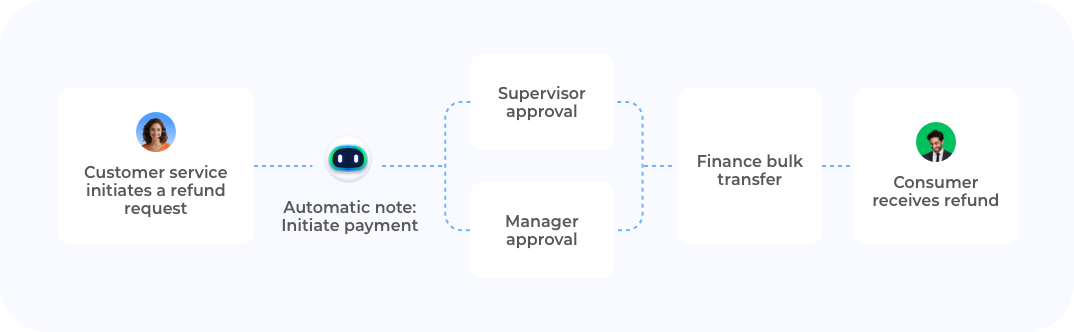
A digital ticket system improves service in four key ways.It centralizes requests for organized ticketing.It automates workflows for faster ticketing.This ticket system empowers agents for quality resolutions.It also provides data for smart improvements.Adopting a comprehensive ticket system like Instadesk's is an investment in operational excellence.This ticketing approach builds customer loyalty.A good ticketing system is essential for modern support.
Businesses can improve their service ticketing.Embark on Your Contact Journey toward better support today.
FAQ
1. What is a ticket system?
A ticket system is software that turns every customer request into a trackable event.This ticketing tool organizes each event,ensuring no issue is lost.It creates a central place for all support activities,making the entire ticketing process more efficient for every event.
2. How does ticketing improve service for an event?
Effective ticketing streamlines how teams handle each customer event.The system automates the creation and assignment of every event.This ensures a fast response for any event.Better ticketing leads to quicker resolutions and a better experience for every event.
3. Can a system handle more than one type of event?
Yes,a digital ticket system manages every type of customer event.It can categorize each event by its topic or urgency.This allows teams to prioritize their work.The system's flexibility makes it a powerful tool for diverse support needs and ticketing tasks.